
EM-140 DG SA-STTL - External Flash SIGMA - Free user manual and instructions
Find the device manual for free EM-140 DG SA-STTL SIGMA in PDF.


| Product type | Macro electronic flash with tilting head and TTL control |
| Brand | SIGMA |
| Model | EM-140 DG SA-STTL |
| Guide number | 14 (100 ISO/m) |
| Power supply | 4 AA alkaline batteries or 4 Ni-Cd/Ni-MH AA rechargeable batteries |
| Recycling time | Approx. 4 s (alkaline batteries), 3 s (Ni-Cd/Ni-MH rechargeable batteries) |
| Auto power save | Yes, after approx. 300 seconds of inactivity |
| Color temperature | For daylight type color films |
| Weight | 430 g (control unit + flash unit) |
| Dimensions (control unit) | 76.7 mm (W) x 136.2 mm (H) x 82.4 mm (D) |
| Dimensions (flash unit) | 126.6 mm (W) x 128.8 mm (H) x 30.54 mm (D) |
| Main features | Automatic TTL, manual flash (1/1 to 1/64), FP high-speed sync, 2nd curtain sync, stroboscopic flash, predictive flash, exposure compensation ±3 EV, flash ratio (8:1 to 1:8), wireless flash (master/slave) |
| Camera compatibility | SIGMA SD and SA SLR cameras (SD, SA series) |
| Supplied adapters | Macro adapters for filter threads Ø55 mm and Ø58 mm |
| AF assist lamp | Yes, activated by LAMP button (duration 20 s) |
| LCD backlight | Yes, via LIGHT button (approx. 8 s) |
| Maintenance and cleaning | Use a soft, damp cloth; do not use solvents, benzene, or chemicals |
| Safety precautions | Do not disassemble (high voltage); avoid flashes near eyes; do not use in flammable atmosphere; protect from water and shocks |
| Storage | Dry, temperate, ventilated place; remove batteries if not used for a long time |
| Certification | CE marking |
Frequently Asked Questions - EM-140 DG SA-STTL SIGMA
User questions about EM-140 DG SA-STTL SIGMA
0 question about this device. Answer the ones you know or ask your own.
Ask a new question about this device
Download the instructions for your External Flash in PDF format for free! Find your manual EM-140 DG SA-STTL - SIGMA and take your electronic device back in hand. On this page are published all the documents necessary for the use of your device. EM-140 DG SA-STTL by SIGMA.
USER MANUAL EM-140 DG SA-STTL SIGMA
Thank you for purchasing the Sigma Electronic FlashMacro EM-140 DG. The advanced features of this flashgun allow you to enjoy AF Macro photography. Depending on the camera model, functions and operation may vary. Please read this instruction booklet carefully. To add to your enjoyment of photography, the flash has a variety of features. To make the most of all these features, and to get the maximum performance and enjoyment from your flash, please read this instruction booklet, together with your camera's instruction manual, before using the flash, and keep it handy for future reference. (This Flashgun is exclusive for SIGMA SD,SA series cameras)
PRECAUTIONS
In order to avoid causing any damage or injury, please read this instruction manual very carefully, paying attention to the cautionary signs below, before using the flash. Please take special note of the two cautionary signs below.

Warning !!
Using the product disregarding this warning sign might cause serious injury or other dangerous results.

Caution!!
Using the product disregarding this caution sign might cause injury or damage.

Symbol denotes the important points, where warning and caution are required.
Symbol contains information regarding the actions that must be avoided.

Warning !!

This flash contains high voltage circuits. To avoid electric shock or burns, do not attempt to disassemble the flash. If the outside shell of the unit is broken or cracked, do not touch the mechanism inside.

Do not fire the flash close to eyes. Otherwise the bright light could damage the eyes. Keep at least 1m/3feet distance between face and the flash unit, when taking a picture with flash.

Do not touch the synchro terminal of your camera when the flash is attached to hot shoe. High voltage circuitry could cause electric shock.

Never use your camera in an environment where flammable, burnable, gas, liquids or chemicals, etc, exist. Otherwise, it might cause fire or explosion.

Caution !!

Do not use this flash unit on any camera other than the SIGMA SD,SA series cameras; otherwise the flash may damage the circuitry of these cameras.

This flash unit is not waterproof. When using the flash and camera in the rain or snow or near water, keep it from getting wet. It is often impractical to repair internal electrical components damaged by water.

Never subject the flash and camera to shock, dust, high temperature or humidity. These factors might cause fire or malfunctioning of your equipment.

When the flash is subjected to sudden temperature change, as when the flash unit is brought from a cold exterior to warm interior, condensation might form inside. In such a case, place your equipment in a sealed plastic bag before such a change, and do not use the flash unit, until it reaches room temperature.

Do not store your flash in a drawer or cupboard etc., containing naphthalene, camphor or other insecticides. These chemicals will have negative effects on the flash unit.

Do not use a thinner, Benzene or other cleaning agents to remove dirt or finger prints from the component. Clean with a soft, moistened cloth.

For extended storage, choose a cool dry place, preferably with good ventilation. It is recommended that the flash be charged and fired several times a month, to maintain proper capacitor functioning.
Flash Unit
1.Left Flashtube
-
Right Flashtube
-
Auxiliary Light
-
Release Tab
5.MacroFlash Adapter
Controller Unit
6LCD Panel
7.Battery Cover
8.Shoe Ring
9.Shoe
10 MODE Bu
- SELECT Button
12.
Increment Button
13.
Decrement Button
-
LAMP Button
-
TEST Button
16.LIG
HT Button
- Ready Light
18.Power Switch
LENS USABILITY
Although this Flash is designed specifically for Macro lenses (MACRO 50mm F2.8 EX DG, MACRO 105mm F2.8 EX DG, etc.) it is also possible to use it with other lens types, however please pay attention to the following points.
Front part or other parts of some lenses rotate while focusing, and also attaching the ring flash to such lenses would affect focusing mechanism of your camera, possibly resulting in malfunction. Please use Manual Focus only with such lenses.
055mm, and 058mm filter MacroFlash Adapters are bundled with your flashgun. If you want to attach your flashgun to a lens which has a different filter size then please purchase separately a MacroFlash Adapter. (Only 62mm, 72mm, 77mm macroflash adapters are available).
Depending on the lens' focal length or the distance to subject or another reason, it is possible that your image might be affected by vignetting. Please take some test shoots first to be sure that your setting is not causing vignetting.
ABOUT THE BATTERY
This flash unit uses four "AA" type Alkaline dry cell batteries or Ni-Cad, Ni-MH, rechargeable batteries. Manganese batteries can also be used but as they have a shorter life than Alkaline batteries, we do not recommend using them. Please replace batteries if it takes more than 30 seconds to light the Ready Lamp.
To assure proper electrical contact, clean the battery terminals before installing the batteries
NiCad batteries do not have standardized contacts. If you use NiCad batteries, please confirm that the battery contacts touch the battery compartment properly.
To prevent battery explosion, leakage or overheating, use four new AA batteries of the same type and brand. Do not mix the type or new and used batteries.
Do not disassemble or short-circuit batteries, or expose them fire or water; they may explode. Also, do not recharge the batteries other than Ni-Cd rechargeable batteries.
When the flash will not be used for an extended period of time, remove the batteries from the flash, to avoid the possibility of damage from leakage.
Battery performance decreases at low temperatures. Keep batteries insulated when using the flash in cold weather.
As with any flash, it is recommended you carry spare batteries when on a long trip, or when photographing outdoors in cold weather.
BATTERY LOADING
- Be sure to set the Power Switch to the off position then slide, the battery cover in the direction of the arrow to open.
- Insert four AA size batteries into the battery chamber. Be sure the + and - ends of the batteries are aligned according to the diagram in the chamber.
- Close the cover.
- Slide the Power Switch to the ON position. After few seconds, the Ready Lamp will light, indicating that the flash unit can be fired.
- Please press the "Test Button" to be sure that the flash is working properly.
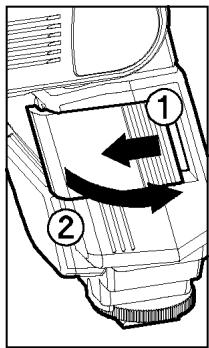
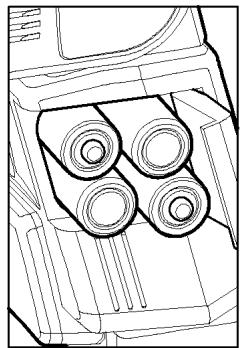
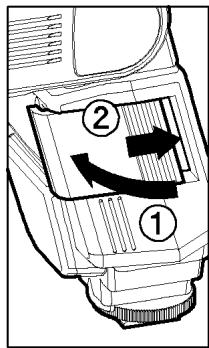
AUTO POWER OFF
To conserve battery power, the flash unit automatically turns itself off when the flash is not used within approximately 5 minutes. To turn the flash on again, depress the TEST button or the camera shutter button, halfway. Please note that, "Auto Power Off" mechanism does not work with wireless TTL flash mode, normal slave flash, and designated slave flash modes.
ERROR INDICATION
If the battery power is not sufficient or there is electric information error between the camera and flash unit, the "Flash Coverage Angle" will blink on the LCD panel. When this occurs, turn the power switch off and on.
If it still blinks, after this procedure, check the battery power.
ATTACHING THE CONTROLLER UNIT
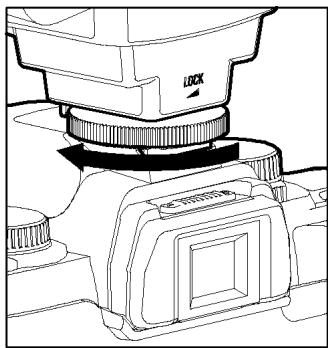
Be sure turn off the Power Switch. Then insert the Shoe Base into the hot shoe on the camera and turn the Shoe Locking Ring until it is tight.
When you attach or remove the flash, grasp the bottom of the flash to prevent damage to the shoe foot and camera's hot shoe.
If the camera's built-in flash is set in up position, please close it before you attach the flash unit.
To remove the flash, rotate the shoe-locking ring in the opposite direction of LOCK mark, until it stops.
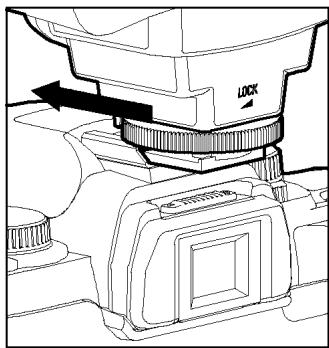
ATTACHING THE FLASH UNIT
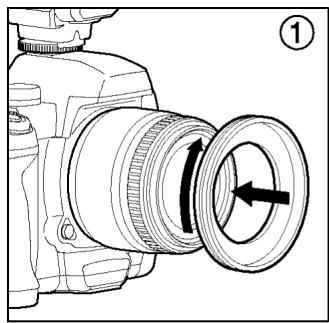
- Attach the MacroFlash adapter to the lens' filter tread.
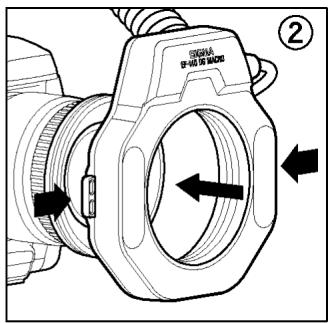
- While pressing the left and right release tabs on both sides of the holder, place the flash unit over the adapter, then release both tabs.
You can adjust the position by rotating the flash unit.
Press the release tab when you detach the unit from the lens.
LCD PANEL ILLUMINATION
When you press the LIGHT button, the LCD panel will illuminate for about 8 seconds. The illumination stays on longer than 8sec, if you press the LIGHT button once again.
AUXILIARY LIGHT
If LAMP button on the Flash Units is pushed, the auxiliary light will emit for 20 seconds. In a dark place, it will be easy to focus by using the auxiliary light. This fuction is very convenient when composing pictures where auto focus does not operate well or where focus adjustment in manual is difficult.
If the shutter button is depressed it will stop working.
TTL AUTO FLASH
In the TTL AUTO Mode, the camera will control the amount of flash lighting to provide the appropriate exposure for the subject.
- Set the camera's exposure mode to P Mode. (In the case of SA-300, SA-300N and SA-5 set to “*” fully automatic mode)
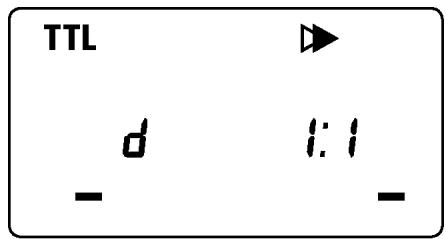
- Turn on the power switch of the flash, the TTL mark will appear on the LCD panel and flash will start charging. (If TTL mark does not appear, depress the MODE button several times to select the TTL mode).
-
Focus on your subject.
-
Check that the subject is located within the effective distance range, indicated on the LCD panel.
- Press the shutter button, after the flash is fully charged.
When the flash is fully charged, the ready light in the viewfinder, and appears on the flash unit.
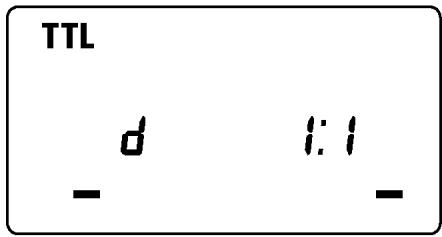
The TTL exposure is controlled by the S-TTL system of the digital camera. If the flash is set to TTL, the character "d" (digital) will be displayed on the LCD panel.
When the camera receives the appropriate exposure, the TTL mark on the LCD panel will appear for 5 seconds. If this indication does not appear, the flash illumination is not enough for that situation. Please re-take the picture, at a closer distance.
If the SA-300, SA-300N and SA-5 cameras, are set to “*” fully automatic mode, Flash will automatically switch to TTL mode only. For other camera exposure modes, the flash will be set to the last chosen mode each time.
When the flash is fully charged, the flash mark will appear in the finder. If the shutter is released before the flash is fully charged, the flash will not fire, and the camera will take the picture at a slow shutter speed.
SD(S-TTL)
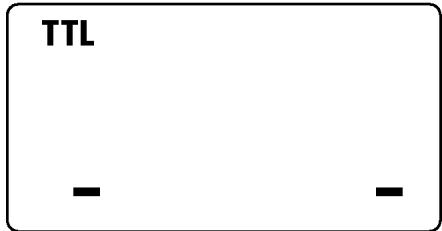
SA(TTL)
It is possible to give the three dimensional effect to your pictures by adjusting the flash ratio of left or right flash tube or by firing only one side of the flash.
SD series
- In the S-TTL mode, the flash ratio blinks when you press SEL button.
- Press the + or button to set the flash ratio.
Pressing + button will increase the left flashtube and pressing - button will increase the power amount of the right flashtube. The ratio can be set up among 8:1~1:8. Press the + or - button to trigger only one side. (flash ratio will not be displayed and only firing side will blink)
- Press the SEL button several times to stop the blinking.
If the flash ratio is set to 1:1 or the mode is changed, this function will be cancelled.
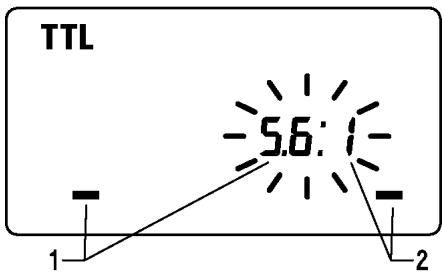
SD(S-TTL)
SA series
Flash ratio cannot be set. Only one side can be set.
1. In the TTL mode, press the SEL button to make the Flash Unit display blink.
2. By pressing the + button, the left flashtube will fire, and by pressing the - button, the right flashtube will fire. (Only the firing side will blink on the flash unit display)
3. Press the SEL button several times to stop the blinking.
After shooting please press button and then the + or - button. 1-By doing this flash unit will be set to default mode, display will show both sides.
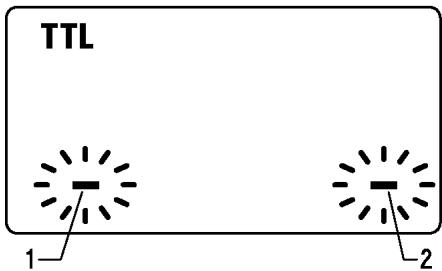
SA(TTL)
USING FLASH IN OTHER CAMERA MODES
Shutter Speed Priority Setting
By selecting the S mode of the camera, you can set the shutter speed from 30sec. to 1 / X sync speed. When you set the desired shutter speed, the camera will select the appropriate aperture value for the background. If the subject is too light or too dark, the aperture value indicator will blink and show the limit values (maximum or minimum aperture). In such as case, the camera proceeds to take flash photograph at the limit value. Thus, the main subject in the picture may be exposed correctly, but the background will become under or over exposed.
Aperture Priority Setting
By selecting the A mode of your camera, the camera will select the appropriate shutter speed for the background. If the subject is too bright or too dark, the shutter speed indicator will blink and show the limit highest or slowest shutter speed value. The highest shutter speed will be limited to the camera's normal flash synchronization speed. In such a case, the camera proceeds to take a flash photograph at the limit value. Thus, the main subject in a picture may be exposed correctly, but the background will become under or overexposed.
When used with M Mode
You can set the desired shutter speed and aperture value. You can set the shutter speed from top sync speed to bulb. If you adjust the exposure according to the exposure meter indication, the camera will work as for Daylight synchronization flash or slow, synchronization.
In the case of use with SD9, SD10, depending on the ISO setting, shutter speed will change to slow shutter speed side. For more detailed information, please refer to Exposure Mode selection.
LIMITS OF CONTINUOUS SHOOTING
To prevent overheating of the flash's circuitry, please do not use your Flash unit for at least 10 minutes after using the number of flash exposures, shown in the below table have been made in quick succession.
| Mode | Number of Flash Exposures |
| TTL, M(1/1,1/2) | 15 Continuous Flash Shots |
| M(1/4, 1/8) | 20 Continuous Flash Shots |
| M(1/16-1/32) | 40 Continuous Flash Shots |
| Multi | 10 Cycle |
Manual flash provides adjustment of desired flash intensity (flash output level).
The shooting in Manual Mode requires a very advanced technique. We recommend you use the Auto mode. When using Manual Flash photography, first take some test shots. It will be beneficial to use a flash meter device for determining the exposure.
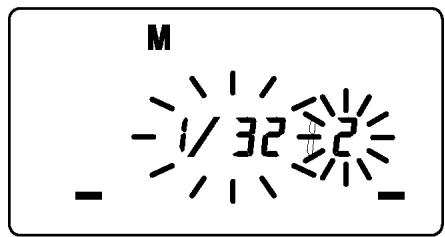
Flash intensity of left and right tubes can be set between 1/1 1/64 . It is also possible to set without firing one of them.
1. Set the camera's exposure mode to M.
2. Press the MODE button on the flash unit to select M.
3. Press the SEL button. (The flash intensity display of the left flashtube blinks).
4. Press the + or - button to set the left flashtube output level. (If " -- " is displayed, the left flashtube will not fire).
5. Press the SEL button. (The flash intensity display of right flashtube will blink).
6. Press the + or - button to set the right flashtube output level. (If " -- " is displayed, the right flashtube will not fire).
7. Press the SEL button to stop the indicator blinking.
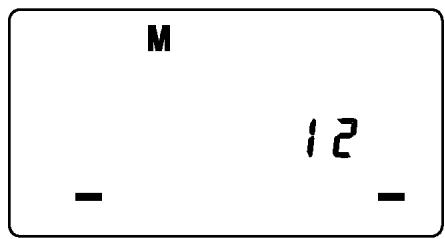
If the flash output level values of both tubes are the same, the flash output level will be displayed. When the different flash intensity is set, the flash output level will not be displayed on the LCD.
Regarding Guide Number, please refer to the [Table.1] on the last page.
You can calculate the correct exposure by using the following formula: Guide Number “GN” / Flash to Subject Distance = F-stop
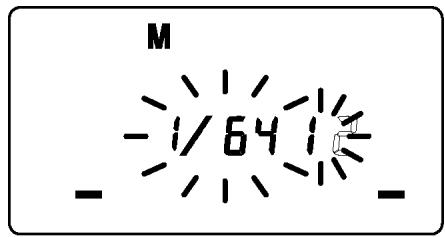
FP FLASH (Except SA-300)
When you take a picture with an ordinary flash, you cannot use a shutter speed faster than the camera's synchronized speed because the flash must fire when the shutter curtain is fully open. The FP flash keeps firing, while the shutter curtain is running. Thus you can use a shutter speed faster than the synchronized speed.
- Set the camera's exposure mode to M mode.
- Press the MODE button on the flash unit, to select the M.
- Press the + or - button and make the indicate FP indicator appear on the LCD panel.
- Set the shutter speed.
- Focus on the subject
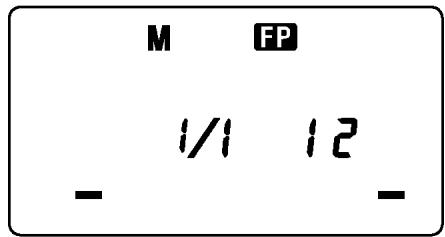
- Please use the Guide Number value given on the table 2 (last page of this instruction manual) for calculating the F-number that must be set on the camera.
Guide Number “GN” / Flash to Subject Distance = F-stop
- When the Ready Light of the flash is illuminated, the unit is ready for use.
If you want to cancel the FP Flash mode, please follow the FP flash procedure to make the FP indicator display from the LCD panel.
SECOND CURTAIN SYNCHRONIZATION
When you photograph a moving subject with slow synchronization, usually the furrow of the subject will be exposed in front of the subject. The ordinary flash light will fire when the first shutter curtain is fully opened, thus the subject will be exposed from the time flash is fired to the time the shutter is closed (This is called First Curtain Synchronization). When you use second curtain synchronization, the flash will fire just before the second curtain begins to closes, and the subject will be exposed by ambient light from the time the shutter opens until the flash fires. The furrow of the subject will therefore be exposed behind the subject, creating a more natural effect.
- Set the desired picture-taking mode of the camera
- Select the Mode of the flash. (TTL, M modes. SD9 and SD10 can be used in M mode only)
- Press + or -, button mark will be displayed on the LCD panel.
- Adjust the focus, and take the picture after confirming the ready light is lit.
First curtain synchronization will be set, if mark is not displayed.
In the Full Auto Mode * of SA-300, SA-300N, SA-5 cameras, this function cannot be used.
To cancel second-curtain synchronization, turn off the mark on the LCD panel.
MODELING FLASH
If you use the Modeling flash, you can check the lighting and shadow effects, before you take the picture.
- Press the MODE button and select the mode.
- Press the + button or - button several times to make the MODEL icon on the LCD panel appear.
- Confirm that the flash is charged, then press the TEST button to fire.
EXPOSURE COMPENSATION
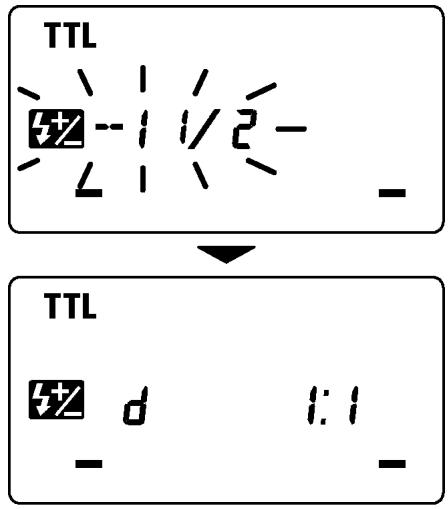
You can use flash exposure compensation in combination with normal exposure compensation (to control the background exposure level) in flash picture. Flash exposure compensation can be set 1/2 stops (1/3 stops with SD10) in ± 3 -stop increments.
- Press the MODE button and select the TTL mode.
- Press the SEL button to make the indicator of mark blink.
- Press the + button or - button to set the compensation amount.
- Press the SEL button to make compensation amount indicator stop blinking.
- Focus on the subject.
- You can take the picture after confirming that the Ready Light of the flash is illuminated.
When you set the exposure compensation on the camera, both the flash power level and background can be compensated.
You can use both exposure compensation by flash, and exposure compensation by camera at the same time.
While the shutter is open, the flash will fire repeatedly. By doing so a series of images of the subject will be exposed in one frame. A dark background with a bright subject shows more effectively in this mode. It is possible to set the firing frequency between 1Hz and 199Hz. Up to 90 flashes can be fired continuously. The maximum number of flashes varies, depending on the flash guide number and firing frequency settings. (Please refer to table3 on the last page).
- Set the camera's exposure mode to M mode, and set the F number
- Press the MODE button until the Multi-flash mode appears
- Press the SEL button until the flash firing frequency starts to blink.
- Press the + or - button to set the desired flash frequency value.
- After pressing the SEL button again, the flash power level will blink.
- Press the + or - button to set the desired power level.
- Press the SEL button again, the number of flashes will blink.
- Press the + or - button to set the desired number of flashes.
- Press the button again, the display will stop blinking.
- When the ready light of the flash is illuminated, the unit is ready to use.
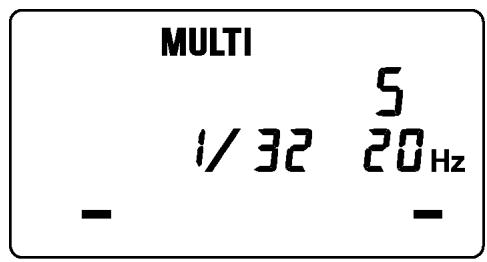
Note: Please set the shutter speed longer than; Number of Flashes you want ÷ Firing Frequency
WIRELESS FLASH (SD10 ONLY)
It is possible to use Wireless Flash photography if this flash unit is used as a master flash and the EF-500 DG SUPER SA-STTL (SA-N) as slave light source.
Master unit (EM-140 DG) fires just for controlling the Slave unit, and does not influence photography.
Control System Change (EF-500 DG SUPER SA-STTL (SA-N))
- Attach the flashlight to the camera and turn on the power switch of the flashlight and camera.
- Press the shutter button of camera halfway. (The camera and flashgun communicate and control system will be switched automatically.)
- Turn off the power switch of the flashgun and camera.
Slave unit Setting (EF-500 DG SUPER SA-STTL (SA-N))
- Press the MODE button to select
- Press button, to make the channel indicator blink, on the display.
- Press + or - button to set the desired channel number.
- Press the SEL button several times until the indicator stops blinking.
- Place the Slave unit at the desired position.
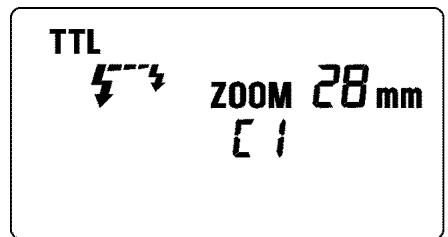
Master unit Setting (EM-140 DG)
- Attach the flash unit to the camera.
- Press the MODE button to select 51 /mark.
- Press button, to make the channel indicator blink on the display.
- Press + or - button to choose the same channel number as set on the Slave unit.
-
Press the SEL button several times until the display stops blinking.
-
Check that both flashes are fully charged.
Ready light lamp will light, and the AF Auxiliary lamp will blink to indicate that the flash is ready for shooting.
12. Adjust the focus on the subject, and take the picture.
It is possible to use designated slave flash function if this flash unit is used as a master flash and the EF-500 DG SUPER SA-STTL(SA-N) as slave light source.
The Slave Controller unit (EM-140) functions only to control the slave unit.
Setting the Slave Flash unit(s) for firing (EF-500)
- Attach the firing flash unit to the camera body.
- Set the camera's exposure mode to S or M mode.
Then set the shutter speed to 1/30 or slower. The slave Controller will transmit the designated signal before the others fire. Thus if you use a shutter speed faster than 1/30, the firing flash units will not be synchronized.
3. Switch "ON" the flash unit, and press the camera's shutter button halfway.
Now, aperture value and film speed are automatically transmitted to the slave flash unit.
4. Remove the slave flash unit from camera.
5. Press the MODE button and select the 53 / 53 . (Slave Mode)
6. Press the SEL button to make the channel display indicator blink.
7. Press the + button or - button to set the channel number. (C1 or C2)
8. Press the SEL button to make the output amount (TL) display indicator of flash blink.
9. Press the + button or - button to set the flash output amount.
0.5 0.7 1 1.5 2 3 4 6 9 13 18 m
1.7 2.3 4 5 7 10 15 20 30 40 60 ft
Set the flash power by setting the distance indicator on the LCD panel to coincide as closely as possible with the actual distance from the slave flash to the subject. If the actual distance is out of range, you need to change the aperture value.
- Press the SEL button several times to make the display stop blinking.
- Place the slave unit in the desired location. Do not place the slave unit within the picture area.
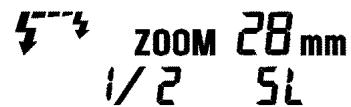
Setting for Slave Controller unit (EM-140 DG)
- Attach the Slave Controller flash unit to the camera body.
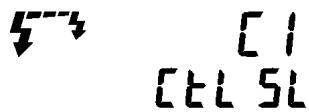
- Press the MODE button and select the 47 [E] [SL (Slave Mode).
- Press the button to make the channel display indicator blink.
- Press the + button or - button to set the same channel number as that set on the firing flash unit.
- Press the SEL button to make the display stop blinking.
- After you confirm that all flash units are fully charged, press the shutter button to take the picture.
When the firing flash unit of EF-500 DG SUPER SA-N is fully charged, the AF Auxiliary Light will blink.
SPECIFICATIONS
Guide Number : 14 ISO 100/m (when the flash is fired at full power)
Power Source : AA Alkaline Battery or AA NiCd Battery or AA Ni-Mh Battery x 4pcs
Recycling Time : about 6.0 sec. (Alkaline batteries)
: about 4.0 sec. (Ni-Cd, Ni-MH Nickel-Metal Hydride)
Angle of Coverage : Vertical / Horizontal 80 degrees
Weight : 430g (without batteries)
Dimensions (Controller): 76.7mm×136.2mm×82.4mm
Dimensions (Flash Unit): 126.6mm×128.8mm×30.5mm
DEUTSCH
The CE Mark is a Directive conformity mark of the European Community (EC).
DEUTSCH
- PRECAUTIONS
- Warning !!
- Caution!!
- Caution !!
- LENS USABILITY
- ABOUT THE BATTERY
- BATTERY LOADING
- AUTO POWER OFF
- ERROR INDICATION
- ATTACHING THE CONTROLLER UNIT
- ATTACHING THE FLASH UNIT
- LCD PANEL ILLUMINATION
- AUXILIARY LIGHT
- TTL AUTO FLASH
- SD series
- SA series
- USING FLASH IN OTHER CAMERA MODES
- Shutter Speed Priority Setting
- Aperture Priority Setting
- When used with M Mode
- LIMITS OF CONTINUOUS SHOOTING
- FP FLASH (Except SA-300)
- SECOND CURTAIN SYNCHRONIZATION
- MODELING FLASH
- EXPOSURE COMPENSATION
- WIRELESS FLASH (SD10 ONLY)
- Control System Change (EF-500 DG SUPER SA-STTL (SA-N))
- Slave unit Setting (EF-500 DG SUPER SA-STTL (SA-N))
- Master unit Setting (EM-140 DG)
- Setting the Slave Flash unit(s) for firing (EF-500)
- Setting for Slave Controller unit (EM-140 DG)
- SPECIFICATIONS
- DEUTSCH
Brand : SIGMA
Model : EM-140 DG SA-STTL
Category : External Flash